Wireless technology is quite rapid, and it may be overwhelming to keep pace. This is more so when marketing materials are not sufficient to point out the differences between the generations. Before diving deeper, understanding WiFi vs Internet can help clarify how wireless technology connects your devices to the online world. When you have just purchased a new router, a laptop, or a smartphone, it is highly likely that you have heard the words WiFi 5 and WiFi 6. But what exactly they are, and whether there is any actual difference in using one instead of the other?
The figures provide an interesting story. WiFi 5 vs WiFi 6 highlights how WiFi 6 gained over half the global market share within just three years of its introduction in 2019, achieving this milestone faster than WiFi 5, which took four years to reach the same level. This transition is also remarkable on the monetary level. In 2024, the worldwide WiFi 6, 6E, and 7 chipset market was worth USD 36.33 billion. It is estimated to reach USD 80.88 billion by 2030, with a compound annual growth rate of 14.6%.
This guide helps you understand precisely what makes WiFi 5 and WiFi 6 different, which one is more suitable for home or office use, and whether upgrading your network equipment by 2026 is worth it.
What Is WiFi 5 (802.11ac)?
The 802.11ac WiFi was released in 2013 under the name WiFi 5. It was rapidly adopted as the class of home and business networking standard and it lasted almost a decade. It supported the majority of the daily internet requirements in those days, and it is still used by millions of routers, laptops, phones and smart home devices.
How Does WiFi 5 Work?
WiFi 5 transmits information exclusively in the 5Ghz range. The band is also faster and has reduced interference as compared to the older band (2.4 GHz) used by the previous WiFi standards. MultiUser MIMO (MUMIMO) was also added to the standard. In the MUMIMO, the router is able to communicate to several devices simultaneously rather than individually. The cons are that MU-MIMO can only be used in downlink data.
This way the router will be able to push data to multiple devices at the same time but each device will have to await its turn to push data back. Moreover, WiFI 5 brought beamforming. Beamforming directs the signal in particular devices as opposed to being omnipresent. This enlarges the range and the connection that is more dependable.
Key Technical Specs of WiFi 5
- Standard: IEEE 802.11ac
- Maximum theoretical speed: 3.5Gbps (Wave 2)
- Frequency bands: 5 GHz, only (dualband it is compatible with 2.4 GHz routers)
- Channel width: Up to 160 MHz
- MUMIMO: Downlink (up to 4 simultaneous streams) only.
- Modulation: 256‑QAM
- Security: WPA2
What Is WiFi 6 (802.11ax)?
The most significant consumer wireless to date was WiFi 6 (IEEE 802.11ax), which was released in 2019. It was a design oriented more on speed and intelligence and addressed the issue of multiple devices competing in the bandwidth in modern offices and homes.
How Does WiFi 6 Work?
The WiFi 6 operates in 2.4 GHz band and 5 0GHz band. Its main enhancement is the OFDMA that divides each channel in small units of resource so that the router could serve many devices simultaneously like a bus loaded with a number of passengers.
WiFi 6 also adds MU-MIMO stream eight (in both downlink and uplink) compared to WiFi 5 with four downlink streams only. It includes Target Wake Time (TWT) which will allow the router to schedule when the devices wake to receive or send data, increasing battery life of smartphones, smart speakers, and IoT sensors.
Key Technical Specs of WiFi 6
- Standard: IEEE 802.11ax
- Maximum theoretical end-of-pipe speed: 9.6 Giga bits per second.
- Frequency bands 2.4 GHz and 5 GHz (WiFi 6E will have the 6 GHz band)
- Channel width: Up to 160 MHz
- MUMIMO: Uplink and downlink (up to 8 simultaneous streams)
- Modulation: 1024‑QAM
- Security: WPA3
- The essential new technologies include: OFDMA, TWT, BSS Coloring.
WiFi 5 vs WiFi 6: Key Differences
Speed and Maximum Throughput
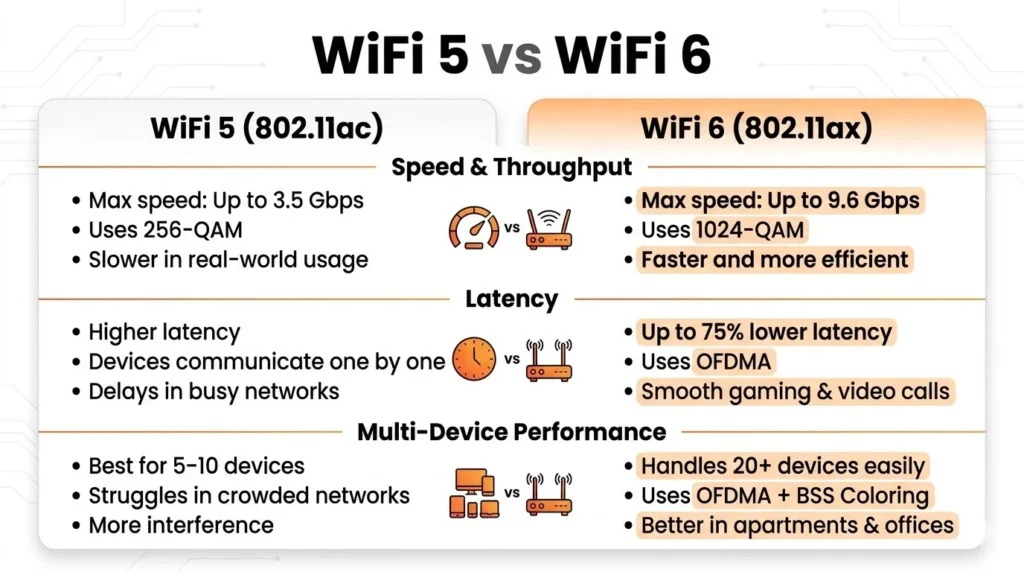
Paper-wise, WiFi 5 vs WiFi 6 shows a clear performance gap. WiFi 6 is approximately three times faster than WiFi 5. While WiFi 5 has a maximum potential speed of 3.5 Gbps, WiFi 6 can reach up to 9.6 Gbps. In real-world usage, both standards rarely achieve these theoretical speeds, but WiFi 6 still delivers noticeably higher performance in practice.
The increased modulation scheme of WiFi 6 (1024QAM, as opposed to 256QAM in WiFi 5) allows WiFi 6 to fit about 25 percent of the information into a single packet. WiFi 6 can ensure that numerous devices are active simultaneously, coupled with OFDMA that divides the channel into numerous subchannels. The gain is evident even in a home that has 15 to 20 devices running. When you are working with just a laptop and a phone, the distinction is less pronounced, though in households that stream a number of 4K videos, play games, and have smart home devices, WiFi 6 is evidently a much smoother experience.
Latency
The delay between requesting a response and receiving it is called latency, and it is very important in the case of video calls, online games, and voice chats.
Through ODFMA, WiFi 6 reduces latency by a significant margin. In WiFi 5, devices wishing to communicate to the router queue sequentially and this causes unpredictable delays particularly in the high traffic networks.
OFDMA also allows the router to have numerous devices simultaneously within a single frame of transmission and hence, each device has to wait very little. Practically, WiFi 6 has the ability to lower the average latency rates to up to 75 per cent in dense environments relative to WiFi 5. This benefit manifests itself in competitive video gaming, live trading, and business video calls.
If you’re comparing WiFi 5 vs WiFi 6 for gaming performance, explore our guide on the best Linux distros for gaming to optimize speed, stability, and overall setup.
Performance in Multi-Device Environments
This is where WiFi 6 is scoring the best.
WiFi 5 was designed with five to ten attached devices in a house. Any modern house now has 2540 gadgets: smart televisions, streaming sticks, robot cleaners, thermostats, security cameras, tablets, phones, laptops, game consoles, and others.
The OFDMA technology in WiFi 6 allocates a unique subchannel to each and every device in a single transmission at any point despite the engagement of the network, ensuring that everyone is on the move without any overwhelming of the network. BSS Coloring is also employed by WiFi 6 which allows routers to differentiate between packets that belong to them and those of other networks. This eliminates interference in apartments, office buildings, and other crowded places, which WiFi 5 was weak in urban environments.
Battery Efficiency with Target Wake Time
WiFi 6 also has a battery life effect as another advantage.
Target Wake Time (TWT) allows one to configure the exact wakeuptime for every device with a wifi 6 router. It means that the device will activate its radio only at such times and remain in a low power sleep state in other cases, which will save a significant portion of battery.
WiFi 5 does not provide such capability, thus it is required of devices to maintain inactive radios, and provide ondemand monitoring of the network, which is battery drain. In devices with smartphones, earbuds, Smartwatches, and Internet of Things devices where battery life is important, WiFi 6 TWT can increase the battery life with significant noticeable gains in cases of moderate or heavy network usage.
How WPA3 Improves Security in WiFi 6 Compared to WiFi 5
WiFi 6 also uses the latest version of WiFi security protocol WPA3, whereas WiFi 5 uses WPA2. WPA3 enhances better security in the following ways. It implements a more secure method of handshake with Simultaneous Authentication of Equals (SAE) that prevents offline dictionary and password guess attacks, which could have occurred in WPA2. It further provides forward secrecy, which implies that a thief may even learn your password in future but he or she cannot decode previous traffic.
To users at home, the WPA3 can be difficult to crack by the intruder even with a weak password since he is unable to exhaust his range to break into the network. The majority of the modern devices are compatible with WPA3 and can operate with WPA2. But you must have the router as well as the gadget to use WPA3 to extract the maximum benefits.
Is WiFi 6 Backward Compatible with WiFi 5 Devices?
Yes, fully. WiFi routers support WiFi 5, WiFi 4, and more fully. Your new router will not reject any devices that were compatible with your old router. Older devices can just attend to the standard they support and they can do the best that they can with that standard, whereas WiFi capable devices can use all the features of the new protocol.
It implies that there will be no threat of your current devices being broken when switching to a WiFi 6 router. Your smartphone, smart speaker, or WiFi 5 laptop that is quite old will be connected without issues. The advantages of WiFi 6 will rise throughout its generation in proportion to the size of all the devices that move to this standard, more generally an automatic process with little effort on your part, hardware replacement continues over a couple of years.
Should You Upgrade from WiFi 5 to WiFi 6?
Yes, you should upgrade if the following is true in your case:
- You have over 10 devices connected in the house and are in active use thus competing with each other on bandwidth.
- You get network overload when you are at the most opportune time, when everyone in the house is online at the same time.
- You play games on the Internet, actively video conference, or telework and need constant and high-speed connectivity.
- You are living in a house, apartment or a congested city where the wireless signals of your neighbors are interfering.
- Your existing router is three years or so and requires replacement anyway.
- You just or are about to buy a WiFi enabled device, all new iPhone, Android flagship, or new laptop.
You Can Wait If:
- You are living alone or live with only one person and possess less than 10 presence of the network.
- The current WiFi 5 version router is good and your internet plan provides you with less than 500 Mbps.
- The budget constraint is high. WiFi 6 has actually improved performance but it can only be felt in the congested, multidevice networks. There will be only fringe benefits to a single user browsing and streaming.
The truthful conclusion is that WiFi 6 is neither a must have upgrade right now, nor a must have upgrade to every home but it is the standard every new router should have in 2026. The WiFi 5 routers are being dropped out of retail stores and replaced by WiFi 6 and WiFi 6E routers, and thus the majority of people purchasing a new router will just wind up with WiFi 6 either intentionally or by default.
Conclusion
WiFi 5 is not bad, WiFi 6 is designed to meet the current needs. Provided you have numerous devices in your place of residence, work partially, or more frequently stream and game, WiFi 6 provides understandable daily discoveries in speed, reduced latency, enhanced efficiency, and higher safety.
There is no immediate need to upgrade. In case the current WiFi 5 network meets the requirements of your household but does not complain, then there is nothing to hurry. The next router you will replace which is an unavoidable occurrence, go with WiFi 6 instead of settling with an older standard.
To the point, WiFi 5 has brought us this far and WiFi 6 is the way to go. Change when it suits you and makes sense and you will be comfortable with the choice.
FAQs
Q: What Is The Key Distinction Between The WiFi 5 And The WiFi 6?
A: The key variations are as follows: speed, efficiency, and the manner in which each of the standards handles several devices. WiFi 6 is capable of 9.6 Gbps (nearly three times 3.5 Gbps of WiFi 5). It is based on the OFDMA to support numerous devices at the same time, halves latency in a busy environment, and supports WPA3 security. Although the use of WiFi 5 is still valid in light scenarios, WiFi 6 is evidently more of an advantage to connected families in the contemporary world.
Q: But What Is The Difference Between WiFi 6 And WiFi 6E?
A: WiFi 6E WiFi 6E is an extension of WiFi 6 which also supports the 6GHz band. Most of the older devices and other networks in the neighborhood do not affect this third band hence providing devices with cleaner and faster connections. WiFi 6E particularly comes in handy in congested cities or in households with the latest smartphones and laptops, although only when both the router and the client support 6 GHz band.
Q: Is WiFi Any Faster Than A Wired Ethernet To Use?
A: No. An Ethernet connection, wired or not, of Gigabit bandwidth has in the majority of realworld scenarios lower latency and more robust data transfer than even a high end WiFi 6. Video production and other processes that require maximum stability, a wired cable is the best option in gaming. WiFi6 reduces the performance gap although it does not completely remove it.
Q: How Long Before WiFi 5 Devices Go Out Of Date?
A: WiFi 5 gadgets will remain usable over a long period of time. WiFi is highly compatible with older standards and thus a WiFi 5 laptop or smartphone purchased today will have no issues with wireless routers that are WiFi 6 compatible and networking in the future. The transition of WiFi 5 is not sharp, there is no deadline and the current WiFi 5 equipment will not start to fail instantly.