
When you have called your internet service provider and said that WiFi is dead, chances are that you have used WiFi and Internet as one term. Several people do but they imply different things. The difference may save you time, money and lengthy wait with customer services.
The application of the internet is becoming extremely prevalent in the U.S. Around over 93 percent of the American population claims to use the internet. Rounding up to 332 million that is 51 million additional compared to 2015.
Nonetheless, a large number of individuals do not know completely how they remain online. The findings of Pew Research Center show that approximately 80 percent of Americans indicate that they have home broadband subscriptions. Wireless routers, cable, and satellite can be used to provide broadband.
So what exactly are they paying for? What is running through the walls of their homes? And what does that little box with flashing lights in the living room actually do? In this guide, we’ll explain WiFi vs Internet in simple, non-technical terms so anyone can understand how it all works.
Understand the Difference Between Wi-Fi and the Internet
Before we enter into technicalities, we can use this analogy that will help you understand.
Think of the Internet as some enormous highway network, a system of roads, which covering the whole country or even the whole world. By this highway, lots of data is transferred among billions of devices, between your laptop, the phone of your friend in Denver, a server in Seattle, and a website in New York.
WiFi on the other hand can be compared to a driveway that connects your home to that highway. The driveway is convenient – it allows access to pull in and out, park and access the road. Nevertheless, the highway is not the road to the driveway. When the highway is closed, you have your driveway, but that will not lead you anywhere.
That’s the key distinction. The Internet is the worldwide connection of the networks. WiFi is a local and wireless network, which links your equipment to your home router, which is subsequently linked to the Internet. The first one gives the destination, the other the ways to get there.
What Is the Internet and How Does It Work?
Google always makes it a point to refer to the Internet as a global web of billions of computers, servers, and devices as it is also known as interconnected network. It started as a project of the U.S. Department of Defense in the late 1960s called ARPANET and has since become the backbone of the existing modern life.
The Internet, in its most basic form, consists of a huge network of physical connections, in the form of undersea cables, fiber-optic lines placed along the streets of cities, satellites orbiting the globe, processing centers the size of football fields, routers, and switches that make all of this work. Once you open a web-page, e-mail a message, or watch a program, information flies over this system at unprecedented rates.
In the US, the Internet is accessed via an Internet Service Provider (ISP). Well known ISPs are Comcast/Xfinity, AT&T, Verizon, and Spectrum and T-Mobile Home Internet, among others. All your ISP connects your house to the wide-area backbone by one of a variety of options:
- Cable Lines (the one used in cable TV)
- Fiber-Optic Cable, fastest and most modern
- DSL (Digital Subscriber Line) over copper phone wires, which is older and slower
- Satellite, available as of now primarily used in rural areas
- Fixed Wireless, in which a radio signal is relayed by a nearby tower
- 5G Home Internet, which makes use of cellular networks.
Connection to the network is charged by ISPs on a monthly basis. This is the fee of the Internet service and not the Wi-Fi. The awareness of this disparity is relevant.
What Is Wi-Fi and How Does It Work?
The concept of WiFi is a system of wireless networking, which allows devices to be connected to a local network and via the local network, to the Internet, without any form of physical dependencies in the form of cables. WiFi is not an acronym but rather, it is a brand name of WiFi Alliance, the body that certifies wireless networking products.
WiFi operates using radio frequencies, usually the 2.4 GHz and the 5 GHz frequency bands. Modern wireless standards such as WiFi 5 and WiFi 6 have significantly improved speed, capacity, and performance, especially in homes with multiple connected devices. The more advanced routers even support the 6 GHz band (WiFi 6E), offering faster and less congested connections. A wireless signal is broadcast by your router all over your home and any gadget you have with built-in WiFi-smart chip (a phone or laptop or tablet or smart TV or thermostat or doorbell camera etc.) is able to attach to the signal without using a cable.
The point is that your router is the one that connects your WiFi net and the Internet. The time your phone is on WiFi connection with your home network, it is communicating with the router. The router in turn is physically connected to your ISP by a coaxial cable or Ethernet that is normally connected to the modem of the ISP that leads to the Internet. In this way, when you type a webpage on your phone, it gets to it in the following manner:
Your device → WiFi signal → Router → Modem → ISP → Internet → Website’s server
Wi-Fi is all love local to your house, office or coffee shop. It is the final wireless tool linking your devices and your router. Even when you lose the Internet connection it is not that your Wi-Fi network stopped working: your devices can still communicate with each other, see and touch one another on the local level, but cannot access anything outside the Internet.
Key Differences Between WiFi vs Internet
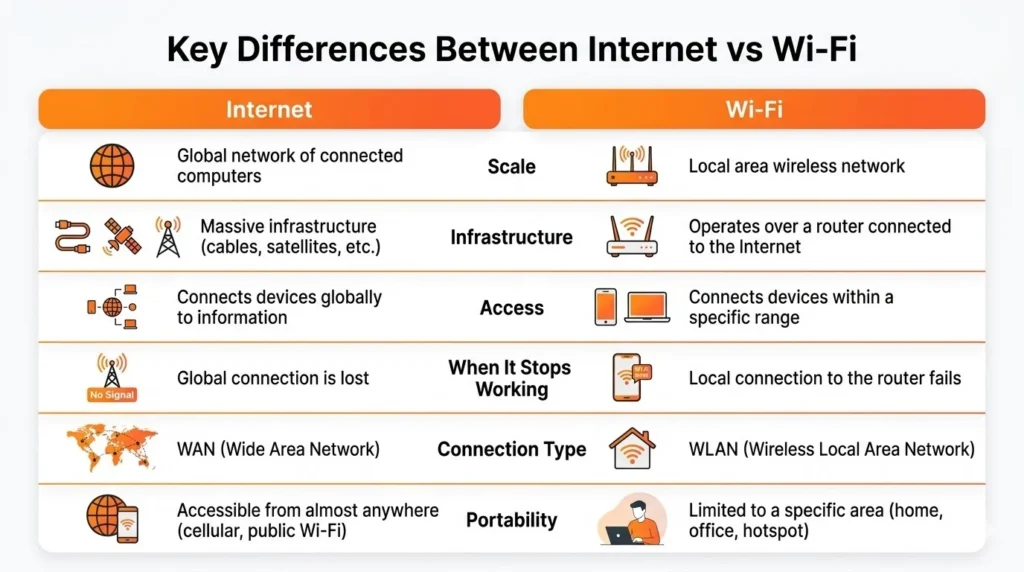
We can draw this out in order to make it impossible to confuse.
Scale: The Internet belongs to the world, and it takes each country, and continent. Wi-Fi is local, and it is in most cases limited within a few hundred feet and it is restricted inside your house, office, or maybe somewhere in a hall.
Infrastructure: Internet is based on an enormous physical infrastructure comprising of undersea cables, fiber lines, cellular towers, and satellites owned by the ISPs, governments, and companies. Wi-Fi uses radio frequencies that are emitted by a router owned or sent out on a rental basis.
How Do You Access It: Your ISP, which is either Comcast, AT&T, Verizon, Spectrum, or any other, provides the Internet to you on a monthly basis. Your router produces Wi-Fi, something you would buy once by manufacturers of Wi-Fi including NETGEAR, TP-Link, Google or Eero.
What Will Occur When It Is Down: When your Internet is down because of an ISP downturn, your Wi-Fi will continue running- you simply have no external Internet. In case your Wi-Fi stops working due to the crashing of the router or power outage, even though your modem is connected to the Internet, your devices cannot covered that distance with wireless Internet.
Connection Types: It is possible to connect to the Internet either wirelessly (Wi-Fi or cellular connection) or use a wired Ethernet connection. By definition, Wi-Fi is a wireless product.
Portability: The Internet goes anywhere with you through the cellular data. Wi-fi is associated with geographical position and router.
Suggested Read:
Can You Have The Internet Without WiFi?
Surely yes, millions of Americans do this day by day.
Wired Ethernet: Most of the desktop computers, gaming consoles, and smart TVs are wired directly to a router or modem with an Ethernet cable. Such devices are fast and are very reliable and they do not rely on WiFi.
Cellular Data (on-the-go): Each time you check the email on your smartphone on your way to or coming back home, scroll through social media on the subway, or use Google Maps, you access the Internet using your carrier 4G LTE or 5G network. That is without WiFi access to the Internet.
Mobile Hotspot: Your cell phone can get a router functionality in which it will broadcast its cellular signal to other devices in the vicinity. Switching on your hotspots makes a tiny WiFi network in which you pay out of your cellular plan although the devices communicate via WiFi.
Can You Have The WiFi Without The Internet?
Yes, When you have your router set, when it is not off, it transmits a WiFi signal even with your internet out. Actually, you can even have your WiFi internet off.
- Devices on your local network can still communicate with each other such as transfers between a laptop and desktop.
- There are smart home devices that can operate in the vicinity, meaning that they can react to a command even when offline.
- Video streaming to devices within your network can still be performed by a local media server, e.g. Plex.
- WiFi printing can be used even without a connection to the internet.
However, in most cases, tasks such as streaming, social media, video calls, browsing and email require WiFi and active internet connection.
Why People Confuse Wi-Fi with the Internet
The fact that one is confused between WiFi and the Internet is quite explainable, and the reasons why it still happens is a bit to explain. WiFi and the Internet came in bottles one after the other to many people. A Comcast or AT&T technician will normally install a modem and, usually, a router or a device that combines a modem and a router known as a gateway. You can be connected to the local WiFi and the Internet in a few minutes. Since they has come together it makes them seem to be the same.
It is also supported by smartphone notifications that enhance a misunderstanding. When you are at home you see WiFi in the status bar of your phone. Leaving indicates an LTE or 5G on the phone. The Internet usage is still the same in both cases, the only difference is in the mode of delivery. With time, WiFi became a short form of online, thus leaving a gray line between the two.
ISPs and tech companies have not always made it more transparent. The conceptual marketing statements like getting fast WiFi often imply having rapid Internet in your house using a router. This is not a technically precise phrase, however, it is a commercially easy phrase.
Wi-Fi vs Internet Speed: Understanding the Real Difference
Speed on the Internet is the bandwidth of your connection out of your ISP to the Internet. And now you pay this much, e.g. a 500mb/s download plan with your ISP.
How fast the data will be transferred between your device and the router wirelessly is how fast WiFi perceives speed. It is based on the age of the router and standard (WiFi 5, WiFi 6, WiFi 6E), the distances between you and the router, and signals between the walls and other devices, and the number of connections that can be made simultaneously.
The practical application of this is that your WiFi may turn into a bottleneck and fail to offer you the Internet speed that you actually paid. With a 1Gbps fiber subscription, but with an outdated router and concrete walls, your laptop at home in the bedroom may only get 50-100Mhps. The Internet is potentially quick enough – the Internet itself is not a bottleneck, but rather the WiFi connection.
That is why when you have some issues with the speed IT professionals and tech support reps suggest to you to connect using a wired connection. Directly into the router using an Ethernet does not rely on WiFi at all and lets you see your real Internet speed, which can indicate either that your Internet service provider or your wireless network is the problem.
Public Wi-Fi vs Home Wi-Fi: How It Works and Why Security Matters
The moment you enter a Starbucks, a library, a hotel or an airport and go to their free WiFi, you are just connected to their own local wireless network. An ISP that the venue pays is then connected to the Internet through that network. A two-layer is exactly the same structure that is there as your local WiFi network then the Internet connection of your ISP.
There is one significant distinction between the public WiFi and security. Most commercial WiFi systems at home are secured by passwords and are encrypted. Free WiFi is usually unprotected or that which is less secured. That is to say that anybody on the same network might get to intercept your data. Due to this fact, security professionals have recommended:
- Using VPN (Virtual Private Network) on open WiFi.
- Do not log in to sensitive accounts like online banking and so on- when using a public network.
- Prefer HTTPS websites. In your internet address, find the padlock icon to your browser.
- Use your cellular internet on your phone when performing sensitive activities as opposed to open wifi.
A Complete Guide to Wi-Fi Standards and Their Speeds
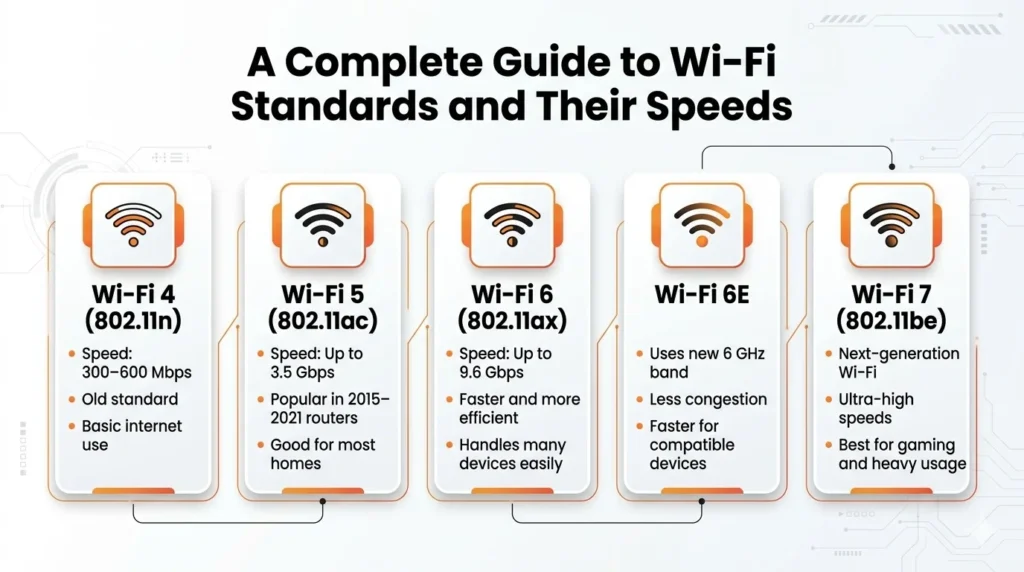
The technology of the WiFi has developed. When you are looking at a new router or these terms are printed on a box, the following is the meaning;
- WiFi 4 (802.11n): The slowest standard with a maximum speed ranging between 300 and 600 Mbps. Many homes still use it. It does simple chores well but is apt to become congested in a busy household.
- WiFi 5 (802.11ac): The new mid-range standard has a possible speed up to 3.5 Gbps. This is used by the majority of routers available in 2015-2021. Most households are contented with it.
- WiFi 6 ( 802.11ax): The modern standard that is being popular and mainstream. It is more efficient and can support more devices simultaneously as well as has a speed of up to 9.6Gbps in theory. It is suggested to the first time router, particularly when there are 10 or above devices associated.
- WiFi6E: This adaption of WiFi6 into the 6GHz spectrum decongests and provides faster speeds on the devices that are compatible with it. The best in congested space or high traffic conditions.
- WiFi 7 (802.11be): The most recent standard, and only yet to be offered in consumer equipment. It is very high-speed, primarily to serve power users, gamer and high end bandwidth homes.
The lesson to be learned: You do not have to possess the latest standard to enjoy a good time. However, when your router is five or six years old or older, there are likely to be much faster speeds, reduced dead zones and many more devices connected at any given time with a WiFi 6 model.
How to Troubleshoot Wi-Fi and Internet Connection Problems
Among longer practical applications of the WiFi-Internet distinction, one can point out the troubleshooting of the connection issues. The following questions might be asked the next time you are in a bind:
Are other devices connected to your network to the Internet? Most likely, a laptop that fails to connect to the Internet when a phone can do so is a problem with either the WiFi adapter built into the laptop or its connections, its settings, or a glitch in a particular device: not your Internet connection.
Are there no devices connected to your network, which can use the Internet? When everything in the house is dead, then it is probably your modem (the Internet connection itself) or your ISP (an outage). Attempt by unplugging and re-plugging your modem and router. Unless that is working, call your ISP.
Does it have good WiFi connection but slow Internet connection? This can then be due to ISP throttling, network congestion in the peak hours or a technical problem with your service plan. Test your raw Internet speed by running a speed test in fast.com or speed test.net when connected using Ethernet.
Not connected to WiFi and the Internet does not load? Determine the existence of Internet connection in your router. The vast majority of routers have a status light, which tells whether the WAN (Wide Area Network) connection, which is a connection between your router and your information service provider, is functioning. When the latter is red or no longer, then the issue is your Internet service and not your WiFi.
How Internet and Wi-Fi Are Evolving in the Modern World
Both the Internet and the WiFi are changing rapidly but in distinct directions. In the US, fiber-optic network is becoming common and a greater number of cities and suburbia experience gigabit-speed internet connectivity. High-speed internet in rural locations is finally becoming viable thanks to satellite providers such as Starlink 5G home internet is also becoming an option in cable in most markets. The federal Infrastructure Investment and Jobs Act allocated 65billion to broadbanding- it has realized that internet access can no longer be viewed as a luxury, like electricity or water.
WiFi is catching up. Multi-gigabit speeds with a significantly reduced latency are coming to the consumer sphere with WiFi 7. Mesh networks building a blanket of continuous WiFi around the house has become standard and even affordable. WiFi is extending out of the homes too. The WiFi 6E and 7 are being installed in stadiums, airports and office buildings to enable thousands of users at the same time.
Internet and WiFi will remain to collaborate with each other- Internet provides you the global connection; WiFi can bring you to the final hop in your house, on your devices, however, it will still keep developing independently.
Ending Thought
To compile all of this:
The Internet is a world-encompassing system of network networks bringing together billions of devices globally. It is accessed with the help of the ISP and requires a monthly fee. It is available either through WiFi, cellular, or wired Ethernet.
WiFi is a localized wireless technology which allows your equipment to be linked to a router through not using any cables. It is a router-generated creation with a restricted range, and one among many possibilities to connect with the Internet. It is not the Internet itself.
Understanding WiFi vs Internet is important because they perform different roles in your home network. You require both in a typical home setup: an Internet service provider offers you your Internet service, and your router distributes that service wirelessly across your devices through WiFi.
The next time your Netflix does not load or a web page is stuck, you will understand what puzzle part you should look at first. It is that knowledge that can go the extra mile of sparing you a call to customer services that lasts half an hour and a router reboot, or an emergency text to your neighbor asking whether the internet is down.
FAQs
1. What is the main Difference Between WiFi and the Internet?
WiFi is a wireless technology that connects devices to a local network, while the Internet is the global network that allows devices to access websites, apps, and online services.
2. Can you have WiFi without the Internet?
Yes, you can have WiFi without the Internet. Devices can still connect to the local WiFi network and communicate with each other, but they cannot access online content.
3. Does WiFi Mean you are Connected to the Internet?
Not always. Being connected to WiFi means your device is connected to a router, but the router still needs an active Internet connection from an ISP to access the web.
4. Is WiFi Faster than the Internet?
WiFi itself does not determine internet speed. Your internet speed mainly depends on your ISP plan, while WiFi affects how efficiently the connection reaches your devices.
5. What Devices are Needed for WiFi and Internet Connection?
To access the Internet through WiFi, you usually need a modem, a router, an Internet Service Provider (ISP) connection, and a WiFi-enabled device like a phone or laptop.