
When your game takes too long to connect, most players assume it’s a slow internet connection or high ping. But the real culprit is often something far more overlooked your DNS server. A slow or misconfigured DNS won’t impact your in-game performance, but it directly affects how quickly your device reaches login servers, matchmaking services, and download servers before a session even begins.
Switching to a faster public DNS server is one of the simplest and most underrated optimizations a gamer can make. It costs nothing, takes under five minutes, and can eliminate a surprising number of connection errors and slow load times.
In this guide, we cover the best DNS servers for gaming in 2026, explain how DNS actually impacts your setup, and walk you through how to change your DNS settings on PC, PS5, Xbox Series X, and your router.
What Is a DNS Server and Why Does It Matter for Gaming?
DNS is an abbreviation of Domain Name System. It is like the telephone book of the internet. Whenever you start a game, a lobby, or a server with many players, your device is unable to read the name of the server. The connection requires a numerical IP address. And that is an IP, turning that name into it in a background manner.
Your computer must have access to remote servers when you play such online games as Call of Duty or Fortnite to load matches, switch regions, or update the computer. Your computer or Xbox does not know about the name of fortniteservers.epicgames.com. It also makes use of numeric IP addresses, and DNS performs the translation.
This is the biggest mistake made by most gaming guides: DNS has no bearing beyond improving how fast your pregame connection is. Using DNS servers for gaming mainly affects how quickly you join a lobby, authenticate, and get matched. Once connected, it does not reduce your in-game ping—latency is determined by your physical distance to the game server. However, a fast DNS ensures smoother connections, fewer drops, better protection against DNS-based attacks, and a more stable overall experience.
In case of the ISP, you accidentally receive a default DNS server. Such servers are also slow, have poor maintenance and at times they record your actions. The migration to a dedicated public DNS server is free, takes about two minutes, and can give your gaming experience a perceptible difference between its beginning and its end.
If you want better performance and a smoother gameplay experience, check out our guide on the best Linux distros for gaming to build a powerful and optimized gaming setup.
What to Look for in a DNS Server for Gaming
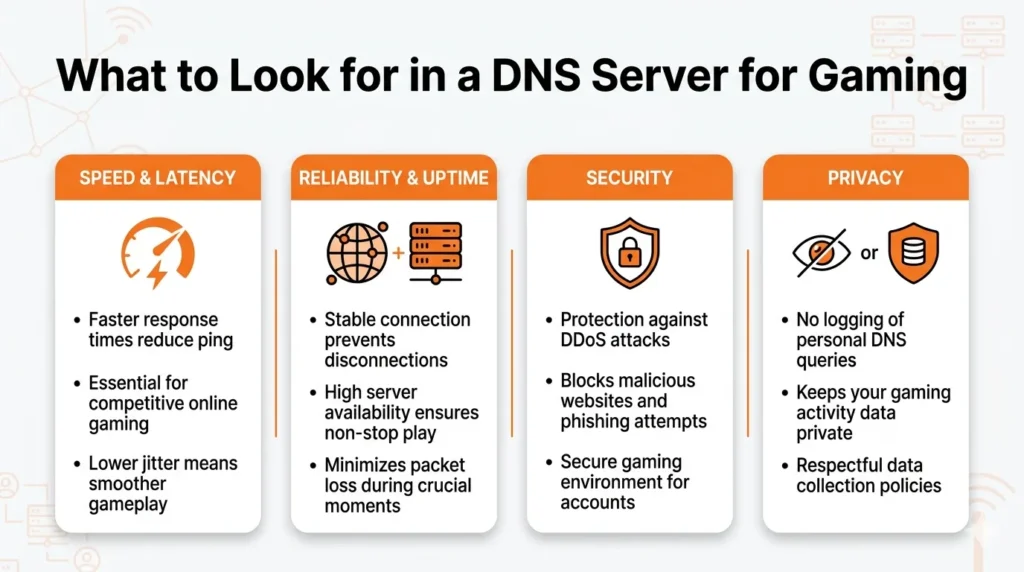
Not all DNS servers are equally developed. Four criteria are the most important with respect to gaming, and you should know them before you decide on one:
Speed and Latency: Select a server that will respond in a few milliseconds. A reduction in resolution time means a decrease in connection time to game servers and matchmaking systems. Tools like Namebench or DNS Benchmark can be used to test what your response times will be like before you make your decision.
Reliability and Uptime: A server that is offline or inaccessible, even in the middle of the session, may cripple your connection over on a whim. Find infrastructure provisions distributed across the globe that have been reported to have high uptime.
Security: Gaming accounts are common targets of phishing, DDoS attacks, and DNS spoofing. The right DNS server is supposed to provide intrinsic protection against bad names as well as malicious names, cache poisoning, and interception. Encrypted protocols such as DNS over HTTPS (DoH) and DNS over TLS (DoT) are encouraged and are an indicator of a security-conscious provider.
Privacy: Your query data is logged and sold to some of our DNS providers, particularly those provided by an ISP. In case you care about having privacy when browsing, opting providers with no logs policies confirmed is a good choice.
6 Best DNS Servers for Gaming
1. Cloudflare DNS 1.1.1.1 / 1.0.0.1
Cloudflare DNS is the quickest public DNS server on the Internet.
Cloudflare DNS has continued to lead tests of independent benchmark contests on the speed of raw resolution. Its Anycast routing code directs your search requests to the closest available Cloudflare server which provides low latency in whichever part of the world you are. Gamers prefer it due to its extremely low latency and good privacy policy. Cloudflare is also one of the fastest DNS providers in the world with an extensive global network that redirects users to the closest server.
In the case of competitive gaming, where the speed of connection to a lobby and the authentication time matter, Cloudflare is the best choice. It has strong support of DoH and DoT, enforces a strict no logs policy that has been audited and has inbuilt defense features against DDoS attacks and DNS spoofing. The disclosed dissimilarity is the only one since Cloudflare does not offer extensive content filtering, unlike some other resources in this list.
- Primary DNS: 1.1.1.1
- Secondary DNS: 1.0.0.1
- Best for: FPS games (Call of Duty, Apex legends), competitive games, Battle Royale (Fortnite, PUBG).
2. Google Public DNS 8.8.8.8 / 8.8.4.4
Google Public DNS is the most stable overall.
The sales volume of its query service makes it one of the largest publicly available DNS services in the world, and its infrastructure reflects that scale. Google Public DNS is widely used among players looking for reliable DNS servers for gaming. While Cloudflare may outperform it in raw speed tests, Google Public DNS is highly regarded for its consistent speed and efficiency. Its vast global network ensures quick query responses, helping reduce minor connection delays.
Google Public DNS will be the safest and most reliable replacement to use in case the gamer is more concerned with connection consistency than pure speed. It defends against Dynabook DNS spoofing attacks and DDoS attacks. It has a global server base that provides global uniform performance.
- Primary DNS: 8.8.8.8
- Secondary DNS: 8.8.4.4
- Best for: MMORPGs, casual gaming and longplay which requires stability.
3. Quad9 9.9.9.9 / 149.112.112.112
Quad9 is a nonprofit making DNS service.
Quad9 is perfect to use when a gamer is concerned about their security, in which case it uses real-time threat intelligence. It matches the query of every DNS request to a continuously updated database of verified malicious domains, including phishing websites, malware suppliers and command and control servers which often occur in Discord chats and in game chat. This is particularly helpful with MMORPG players such as Final Fantasy XIV, whose concern is not so much with speed as the ability to maintain a steady, unbroken connection.
The latency of Quad9 is slightly worse than that of Cloudflare or Google when it comes to most of the benchmark tests, but the security is where no other free public DNS can compete. All queries are encrypted and a complete query history is maintained. Block event notifications are sent to those users who wish to track their traffic.
- Primary DNS: 9.9.9.9
- Secondary DNS: 149.112.112.112
- Best for: Any game that demands a lot of concentration and depends on computer access is bad with young players.
4. OpenDNS 208.67.222.222 / 208.67.220.220
Good when there is a lot of family around and togetherness.
OpenDNS is a well-established publicly available DNS system, which has its infrastructure supported by Cisco infrastructure in the world. It presents good performance in most areas and incorporates content filtering which is quite helpful in joint game rooms like family living rooms, gaming cafes or any other configuration that deals with a wide range of users of varying ages. To families whose gamers are underage or playing as a group, OpenDNS allows blocking mature gaming content, time of day access, and limiting which sites allow access, including easy access via a web dashboard.
Its free version deals with basic web protection and phishing. The OpenDNS Home VIP tier is paid and includes detailed statistics of the usage and increased customization possibilities. Although OpenDNS is not as fast as Cloudflare or Google, its services are more reliable and have good content management tools that make it the best option in certain situations.
- Primary DNS: 208.67.222.222
- Secondary DNS: 208.67.220.220
- Best for: Family gaming systems, MOBA games such as League of Legends, share networks.
5. NextDNS Custom Setup via nextdns.io
Most suitable with customization and power.
The most customizable DNS option on the list is NextDNS and is, perhaps, the least appreciated. NextDNS gives you the option of creating a custom profile as opposed to the case of traditional providers who provide a fixed set of features. You manage blocklists, whitelist particular gaming services, search query logs in real time, and set rules and restrictions and rules which are specific to the devices.
It is very good among players who desire to block network traffic tightly. Block ads and trackers of the game launchers or the shops in the game, block the telemetry of such platforms as Steam or Epic Games, and also create personalized rules that apply to each device. One such example is to have stricter filters on the console of a child and have the gaming PC unlocked.
The global Anycast network maintains latency comparable with the leading providers, and its threat detection is based on AI, which does not undermine its performance. NextDNS also provides a free plan with a query cap and a reasonable unlimited plan to huge users.
- Primary DNS: that is given through the nextdns.io profile.
- Best for: high usage, mixed device profile households, high mobile gaming in terms of advertisements.
6. AdGuard DNS 94.140.14.14 / 94.140.15.15
Better tailored towards cleaner gaming.
AdGuard DNS takes a more privacy-based and adblocking view of the DNS space, however, its performance habits would make it an equally powerful allaround gaming choice. It blocks advertisements, trackers, and telemetry down to the DNS level, which can be particularly helpful when a gamer gets annoyed by intrusive adverts in the free to play launchers and in game shops. The AdGuard DNS removes excessive data by blocking advertisements, tracking scripts, and a few viruses, ping backgrounds consuming bandwidth.
AdGuard DNS uses DoH and DoT and is a strict no logging service, and in recent years, it has increased its worldwide server capacity by a large margin, thus making it a competitive service in Europe, Asia, and other locations. There is also a Family Protection mode that has more content filtering to younger users.
- Primary DNS: 94.140.14.14
- Secondary DNS: 94.140.15.15
- Best for: Mobile gaming, gamers who desire ad-free game launchers, privacy-first users.
If you want clearer communication and a better in-game experience, check out our guide on the Microphones for Gaming to upgrade your gaming setup.
How to Change Your DNS Server
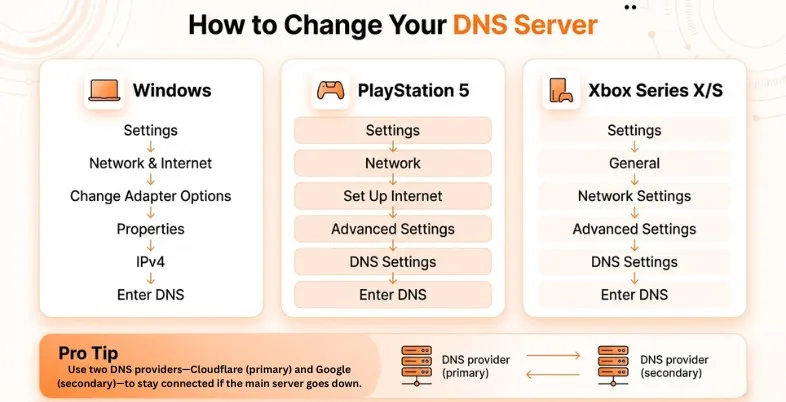
- In Windows: Open settings > Click on Network and Internet > Change Adapter Options > Right click the active connection > go to properties > Internet Protocol Version 4(TCP/IPv4) > manually type in the DNS addresses.
- In PlayStation 5: Open settings > Network > Set up internet connection > Select your network > Advanced settings > DNS Settings > manually type in the DNS addresses.
- In Xbox Series X/S: Open settings > General > Network settings > Advanced settings > DNS settings > manually type in the DNS addresses.
- Pro Tip: Use two providers for your primary and secondary DNS like using Cloudflare as your primary and Google as your secondary. In case the main server is offline, then your system will query the secondary server to ensure that you still stay connected.
How DNS Servers Impact Your Gaming Experience
Online gaming has rapidly become one of the most popular forms of entertainment worldwide, and the numbers clearly reflect this growth. In the past year alone, over 3.6 billion people—approximately 61.5% of global internet users—engaged in online gaming. This massive user base is supported by a booming industry, with the global online gaming market reaching USD 225.28 billion in 2025. Experts predict it will grow significantly, surpassing USD 501.91 billion by 2034, at a steady 9.4% annual growth rate.
With such intense competition and high financial stakes, every millisecond matters in online gaming. Issues like high latency, lag spikes, dropped connections, and slow matchmaking not only frustrate players but can also determine the outcome of competitive matches. While most gamers focus on upgrading hardware or improving skills, one often-overlooked factor can significantly enhance performance—your network configuration, specifically the DNS server.
Optimizing your DNS settings can help reduce lag, improve connection stability, and deliver a smoother gaming experience without the need for expensive upgrades.
Ending Note
Your DNS server is a rather neglected component of your gaming setup, but it is the least complicated component to repair. Switching to DNS servers for gaming can significantly improve your experience. It does not cost anything or take more than two minutes to change the default DNS provided by your ISP to another fast, secure public provider.
Cloudflare (1.1.1.1) is the right place to start for anyone playing a game since it is one of the fastest and has a great reputation in terms of privacy. Players with a strong focus on security might prefer Quad9. OpenDNS or AdGuard can be helpful for families. Meanwhile, NextDNS enables power users to have complete network control with only minimal setup.
Using a DNS benchmark tool allows you to test a few options, then select the one that offers the lowest response time in your location and enjoy a significantly smoother connection every time you load into a match.
FAQs
Q: Will Changing My DNS Help Me Achieve A Lower Ping?
A: Not directly. DNS is just useful in connecting to a server of a game quicker when the game is about to begin. Within the game, ping is also based on the distance between you and the server, it is not based on DNS. But a stable DNS will help minimise the delay in setup and prevent session drops.
Q: Which DNS Server Is Best And Fast To Use In Gaming?
A: Cloudflare (1.1.1.1) is typically a leader in speed tests all over the world. Nonetheless, depending on the geographical site, the ideal DNS may be different, thus you should have a DNS benchmark on any device and then make a selection.
Q: Can My DNS Server Be Changed Without Risk?
A: Yes. Changing DNS is a harmless hack that does not interfere with your internet plan, router, and association with ISP. Quite the opposite, a publicly credible DNS will increase the security compared to an unencrypted ISP default.
Q: Is It Possible To Apply Different DNS Servers To My PC And Console?
A: Yes. Each device may have settings for its DNS. One example is that you can use NextDNS with its own rules on your gaming computer and Cloudflare or Google on your console.
Q: Is It Advised To Pay For A Good Gaming DNS Server?
A: No. These are free Cloudflare, Google Public DNS, Quad9 and AdGuard DNS. NextDNS provides a free quota that is generous and an affordable unlimited plan that has large users. To pay for a DNS server is completely upto each individual as per their wish.