



Shared VPN IPs squeeze you and many other subscribers behind the same address: that’s why CAPTCHAs pop up and log-ins flag you as suspicious. A dedicated IP VPN fixes the address: one private number, fewer reputation hiccups, smoother access.
The catch? Most of those numbers still live in hosting “datacenter” ranges that websites already treat as VPN traffic. In other words, a dedicated IP gives you consistency, not invisibility.
This guide shows you where the upgrade helps, where it falls short, and when paying extra is worth it.
Shared vs. Dedicated in 60 Seconds
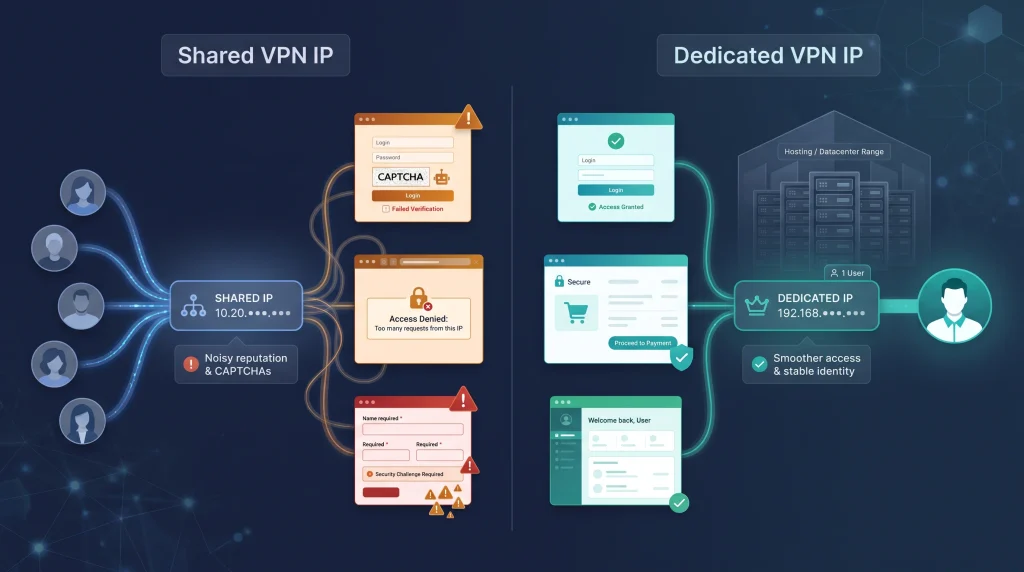
A shared VPN IP puts many subscribers behind one ever-changing address. That setup gives strong crowd anonymity but can hurt the IP’s reputation. A dedicated IP VPN assigns you alone a fixed address, so allowlists are simpler and noisy-neighbor CAPTCHAs fade.
| Factor | Shared IP | Dedicated IP |
| Number of users | Many subscribers | One subscriber |
| Address stability | Rotates regularly | Stays fixed |
| Crowd anonymity | Strong | Weaker |
| Noisy-neighbor risk | Higher | Lower |
| IP allowlisting | Impractical | Straightforward |
| Extra cost | Usually none | Paid add-on |
| Datacenter flag | Common | Still possible |
Two Terms People Keep Mixing Up
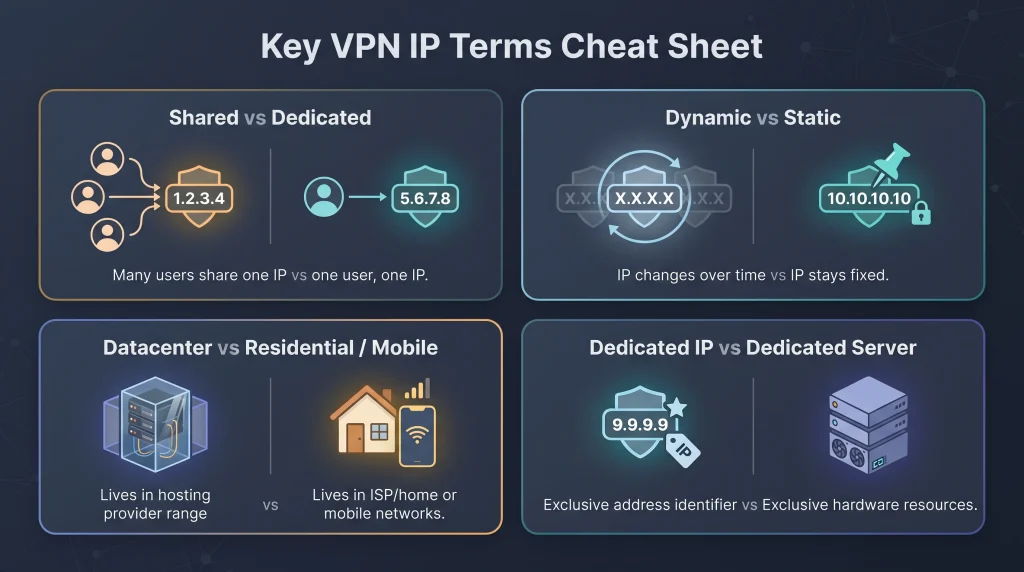
Dynamic vs. Static
Dynamic addresses rotate every session, every day, or whenever the provider decides. A static IP stays until you cancel or the range is retired. A static IP can still be shared, while a dedicated IP is almost always static by design.
Data center vs. Residential or Mobile
Most dedicated VPN IPs sit inside commercial hosting networks. IP-intelligence tools still flag those ranges as hosting or VPN infrastructure even if no one else touches your exact number. Residential space comes from consumer-ISP pools, and mobile space rides a cellular ASN.
The Benefits of a Dedicated IP You Can Feel Right Away
Stable Allowlists and Remote Administration
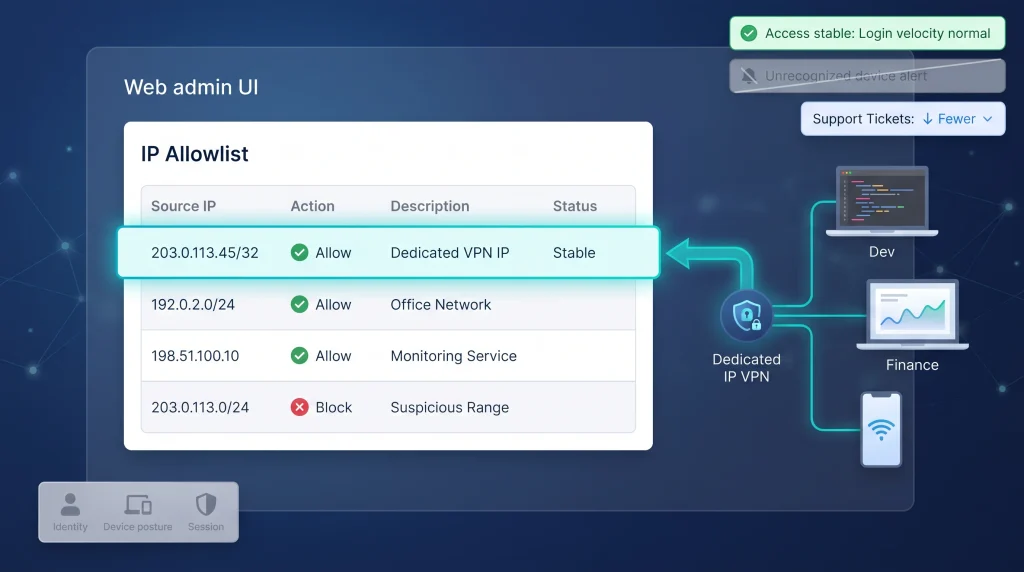
A dedicated IP VPN solves one thorny admin task right away: IP allowlisting. Instead of chasing a shared address that changes every reconnect, you add a single /32 entry to the firewall and leave it. Cloudflare’s own documentation describes dedicated egress IPs as the way to reach services that only allow traffic from a known list of IP addresses.
Important caveat: network location is only one signal. “Network location alone does not imply trust,” the National Institute of Standards and Technology warns, so zero-trust design still layers identity, device posture and session controls on top of any IP rule.
Even so, the convenience is real. Developers can SSH without toggling rules, and finance staff can reach the accounting SaaS from hotel Wi-Fi without begging IT for a temporary opening.
Fewer Noisy-Neighbor CAPTCHAs and Temporary Blocks
Shared VPN addresses collect the logins, scrapers and bulk downloads of strangers, so every spike dents the IP’s reputation.
Google’s reCAPTCHA team confirms that unusual-traffic warnings often fire when you are on “a shared network (such as a corporate VPN or public Wi-Fi) that is generating abusive or automated traffic.” Switching to a dedicated IP removes that background noise, so most sites stop blaming you for someone else’s behaviour.
More Consistent Account-Risk Signals
Banks, subscription platforms and e-commerce sites score every login for risk. One high-weight factor is an IP address that jumps cities or countries between sessions. A dedicated IP VPN removes that noise: you arrive from the same address each time, so the fraud engine sees a calm, predictable pattern. Microsoft’s Entra ID Protection, for example, flags “unfamiliar sign-in properties” when a sign-in does not match a user’s past history.
The payoff is practical: fewer one-time codes, fewer forced password resets and a thinner stack of “Was this you?” alerts. It is not a magic pass. Device posture, cookies and impossible-travel checks still apply, but a fixed IP removes the most volatile signal in the mix.
What a Dedicated IP can’t Fix
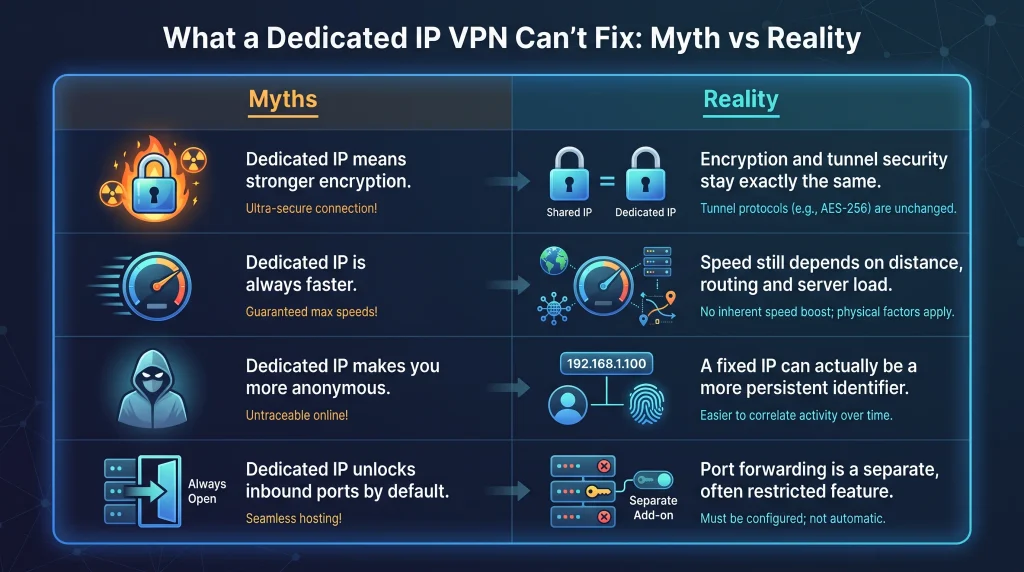
The Encryption Stays Exactly the Same
Whether the exit IP is shared or dedicated, the tunnel still relies on the provider’s protocol and cipher suite, often AES-256 or ChaCha20 negotiated through OpenVPN, WireGuard or IKEv2. A dedicated IP does not harden the tunnel against interception or downgrade attacks.
It Doesn’t Make the VPN Faster
Throughput depends on distance, routing, server load and protocol. A dedicated IP that happens to sit on an idle server may test faster, but a fixed address by itself adds no priority. Even vendors that sell dedicated IPs concede the point: a dedicated IP is not inherently faster than a shared one.
It Can Expose More of Your Browsing Pattern
Shared pools blur activity across many users, while a fixed address is a durable identifier. W3C’s fingerprinting guidance warns that persistent network identifiers help long-term correlation. Reserve the dedicated exit for services that truly need stability, and use the shared pool for everyday browsing.
It Doesn’t Unlock Port Forwarding By Default
Opening inbound ports is a separate feature, often restricted or sold as an add-on. Consumer VPNs block unsolicited traffic to protect users, and many keep that policy even on dedicated IP plans.
The Data Center-Range Catch
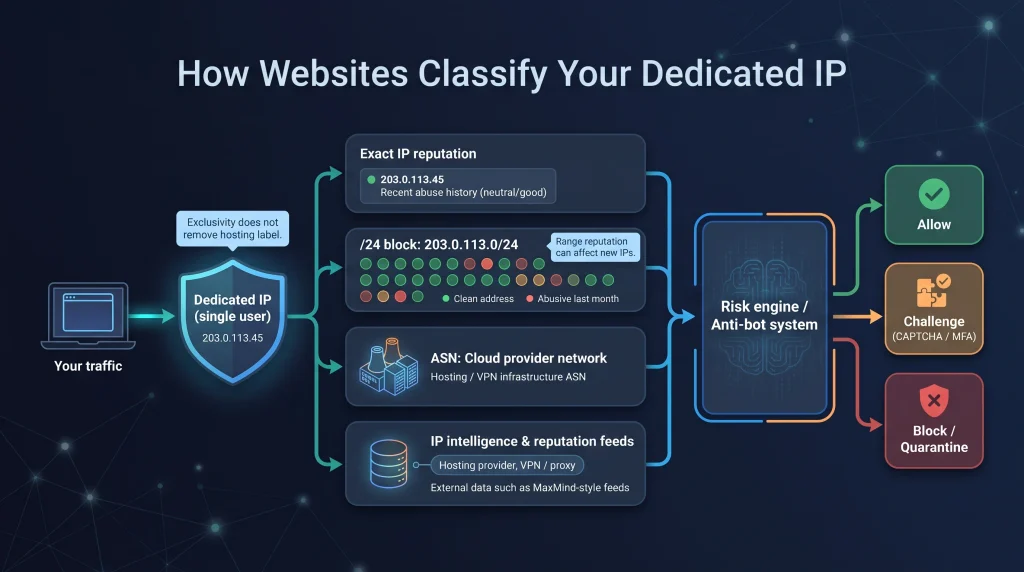
How Websites Classify an IP
Risk engines look at several layers:
- The exact address (recent abuse)
- The surrounding CIDR block
- The autonomous system (ASN) that owns the range
- Hosting, VPN or proxy labels from data-intelligence feeds
MaxMind, for instance, tags an address as hosting provider even if it serves just one user, and many fraud systems treat that flag the same way they treat a known VPN exit. Exclusivity does not erase the hosting label.
Why a Clean Single-User Address Can Still be Blocked
Sites zoom out. If your /24 block helped a credential-stuffing botnet last month or your ASN belongs to a cloud giant, the default rule may be “quarantine first.” Switching to a dedicated IP removes noisy-neighbour traffic, yet the system still sees:
- A datacenter flag
- A new browser profile with no cookie history
- Hardware it has never met
That trio often triggers a CAPTCHA or MFA prompt.
Would a Residential IP Solve the Problem
A residential IP comes from the same ISP blocks that serve homes and cafés, so many filters treat it as normal-user traffic.
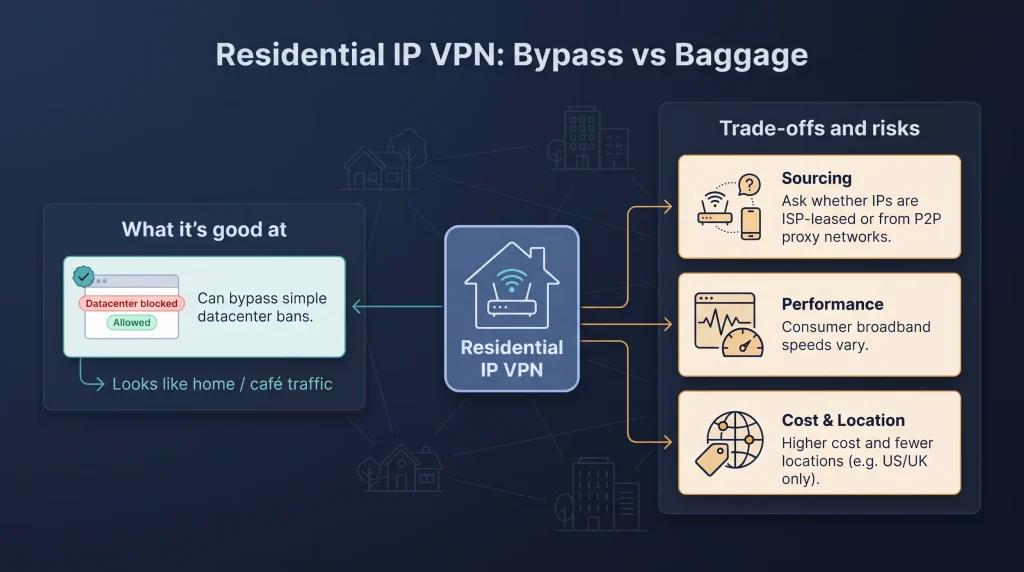
What to check before you pay for one:
- Sourcing Residential space is limited, and some services route you through peer-to-peer proxy networks, where your exit could be a stranger’s phone or router. Ask where the addresses come from. TorGuard VPN, for example, says its Residential IP add-on uses legacy residential addresses leased directly from major ISPs, so the address looks like a regular home connection.
- Locations Residential plans cover far fewer countries than datacenter servers. TorGuard offers its residential IPs in US and UK locations only, so confirm the country you need before you buy.
- Performance volatility Consumer broadband can deliver more variable speeds than datacenter links, so test the connection on the services you need.
- Higher cost Residential IPs are priced above standard dedicated IPs, so keep them for the services that actually block hosting ranges.
Bottom line: a residential IP is the strongest answer to datacenter-range blocks, provided the addresses are leased from real ISPs rather than borrowed from a proxy network and exist in the country you need.
How to Evaluate a Dedicated IP Before Buying
Questions for The Provider
- Is the IP exclusive to your account, or part of a micro-pool?
- Which ASN announces the range, and is it tagged as hosting or residential in major IP databases?
- Can you swap the IP if it lands on a block list or shows the wrong location, and what will it cost?
- Does the plan include inbound port forwarding, and on which ports?
- What is the refund window if speed, location accuracy or compatibility disappoint?
Checks After Activation
- Connect, disconnect and reconnect. Does the public IPv4 stay identical?
- Look up the IP in two databases such as MaxMind and IPinfo, and compare hosting or VPN flags.
- Visit an IPv6 test page. If your ISP’s native v6 appears, disable IPv6 in the app.
- Measure latency and throughput against a shared server in the same city. A large gap points to routing or load, not the dedicated label.
- Log in to the service that made you buy the add-on, and if it balks, contact support before the refund clock expires.
Frequently Asked Questions
Can Websites Still Tell I am Using a VPN?
Yes. Data center or proxy classifications uncover most dedicated IP VPN ranges even when the address is new.
Will a Dedicated IP Unblock Streaming Services?
Not reliably. Platforms such as Netflix and Hulu say they may block all known VPN or proxy addresses, both shared and dedicated.
Conclusion
Think of a dedicated IP VPN as a reliability upgrade, not a stealth cloak. It trims noisy-neighbour CAPTCHAs, steadies fraud scores and makes allowlisting simple, yet it still carries a datacenter label that advanced filters can spot. Choose the option that fits your task, or keep both in your dashboard and switch as needed.