
Whether you’re streaming foreign shows, ensuring your data remains secure on public Wi-Fi, or accessing local services when traveling overseas, it’s easy to choose the right VPN for Philippines with this guide. The Philippines is known for its slow internet speeds, region-locked content, and increasing privacy worries – a dependable VPN ought to have fast servers, powerful encryption, and effortless applications for phones and PCs.
In this blog, we will look at the best VPNs by speed, security, server locations, Netflix and local streaming support, transparency of the privacy policy, and price, so you can choose the best VPN for streaming, playing games, working remotely, or browsing the web. From budget-friendliness to high speeds to privacy protection and log-less services, our down-to-earth and tried recommendations will keep you safe online and get the most out of your internet in the Philippines.
What A VPN Is And How It Works In The Philippines?
A VPN (Virtual Private Network) can be likened to a secure, private tunnel between your device and the internet. It makes you invisible to people on the network, such as people on free Wi‑Fi or even your internet provider, and makes your data unreadable. Your connection is made to a VPN server, which then communicates with the website.
The traffic on the website seems to be from the VPN server’s location, not from the location you are in. A VPN is a service that provides privacy and versatility to internet users.
Here’s The Situation Of How A VPN Functions In The Philippines:
When you access the internet in the Philippines, a VPN encrypts your internet traffic so that others cannot easily understand it.
- Connect to servers in other countries or a Filipino server: websites will “see” that server’s IP address, helping to access region-specific content or additional privacy.
- With a VPN, you are secure from those who might be attempting to spy on your activities or steal passwords on public WiFi hot spots in malls or airport environments, as well as in co-working spaces.
- If you need to watch streaming content, videos, or services that are available only in a specific country, you can select a different server location to access more content without violating the terms and local laws of each streaming service.
- Your internet provider will be able to see that you are utilizing a VPN, but they won’t have the capacity to distinguish the content of your web browsing, giving you an added layer of privacy from typical tracking and Profiling.
Why Do You Need A VPN In The Philippines?
Many people use a VPN for Philippines to improve online privacy, protect personal data on public Wi-Fi, and access websites or content that may be restricted in certain locations. It also helps create a more secure browsing experience while traveling, working remotely, or using banking and shopping apps online.
Benefits of using a VPN in the Philippines:
- Public Wi-Fi is a potential danger – Cafés, shopping malls, and airports in the Philippines tend to offer free internet, which could be a danger for your safety. A VPN scrambles your link, making sure that your passwords and financial details remain confidential.
- Unlock blocked content – Certain websites, shows, or videos on YouTube are blocked in the Philippines. A VPN enables you to circumvent these geo-restrictions and view whatever you desire.
- Keep your web browsing information safe from your ISP – web service providers in the Philippines must retain your web browsing data for 6 months. They and advertisers cannot see your activity with a VPN, making your online life anonymous.
- Don’t slow down speeds (ISP throttling) – If you notice that your internet connection is slower than usual, this could be due to the ISP throttling your speed, which is something to avoid. A VPN conceals your activity, which implies you’re able to obtain 100% speed without down throttling.
- Services in/outside the Philippines – You may not have access to banking services, streaming (PTV, RPN), and websites overseas. A VPN that has a Philippines server will allow you to remain linked with home.
- Have access to websites without compromising your work or studies – Many websites are blocked by schools and workplaces in the Philippines. VPN enables you to be unrestricted and get what you need for remote work or research.
- Play games with friends in the Philippines – A VPN for gaming helps because online games match you according to location. Playing with friends in the Philippines without a VPN will result in matching you with other players from different countries. If you want to play with friends in the Philippines, you need a VPN with a Philippines server.
Comparison table of VPN for Philippines
List Of 12 Best VPN For Philippines
Free VPN for Philippines
1. Proton VPN Free
website: https://protonvpn.com/free-vpn
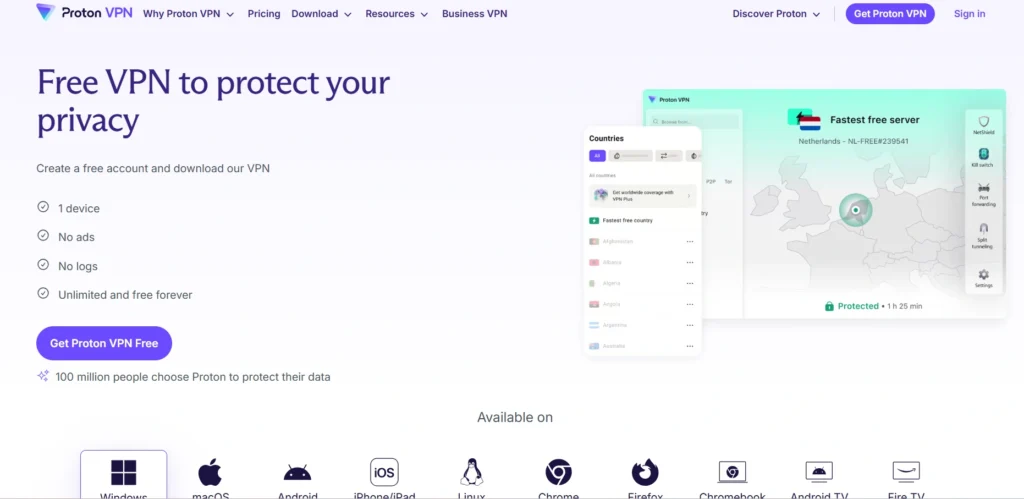
Proton VPN Free is the one ad-free, speed-limit-free, log-free VPN service that allows unlimited data for privacy-conscious users. It is a secure, encrypted browser developed by the creators of Proton Mail, offering secure, encrypted browsing for your data on public Wi-Fi networks and for protection against censorship. The free plan allows you to connect to servers in 10 countries.
It allows for only one device and medium VPN speed, and doesn’t ask for a credit card or subscription. Proton VPN has a no-logs policy, which means your browsing history won’t be tracked, recorded, or sold. It offers streaming services such as Netflix on the free plan, but not so much for the daily streaming of basic privacy and security.
Key Features:
- No data caps – unlimited data is available without limits.
- No ads or tracking
- Nologs policy (audited)
- AES-256 encryption + WireGuard support
- Built-in kill switch
- Open-source apps
Benefits of Proton VPN Free
- Unlimited data
- No ads
- Strict no-logs policy
- Strong security
Limitations of Proton VPN Free
- Limited server locations
- Can connect just one device at a time
- No streaming support
- Medium/slower speeds
Best for: private, secure browsing with unlimited data and no ads
2. PrivadoVPN Free

Website: https://privadovpn.com/freevpn/
PrivadoVPN Free is a secure, free VPN service with no credit card needed, no logging, no tracking, and no storing of your browsing activity takes place within the service; it is built under Swiss privacy laws. The users have access to 12 global server locations across the USA, the UK, Germany, and Canada. The free plan will cover an unlimited number of users, and there are apps for Windows, macOS, Android, iOS, FireTV, and major browsers. It provides unlimited speeds till you use 10Gb/month, then it slows down to 1 Mbps. PrivadoVPN Free also has an automatic kill switch to prevent any data leaks, and it also allows streaming with platforms such as Netflix.
Key Features:
- 10Gb per month (resets monthly)
- 12 global server locations
- 256-bit AES encryption
- Zero-logs privacy policy
- Automatic kill switch
- Applications for all main platforms.
Benefits of Privado VPN Free
- 10GB monthly data with unlimited speed until the limit is reached
- 12–13 server locations available
- Full security features
- Supports multiple VPN protocols
Limitations of Privado VPN Free
- Speed throttled to 1 Mbps
- Only 1 device connection allowed at a time
- No streaming support on the free plan
- No ad blocker, parental controls, or SOCKS5 proxy
Best for: occasional users who require a safe, unthrottled surfing without needing to enter a bank card, and with 10GB per month of data
3. Windscribe Free

Website: https://windscribe.com
Windscribe Free is among the best free VPN providers that allow you to surf the web anonymously and securely without incurring any cost. It allows for unlimited device connections and can be used on Windows, Mac, Linux, Android, iOS, and browser extensions, making it a useful VPN for chrome users.
It doesn’t display ads like many free VPNs, and it doesn’t sell data about users’ activity. Service is perfect for casual browsing, light streaming, and securing connections on public WiFi. It also has a data limit but is still one of the best free VPNs around. It is possible to upgrade to Pro with unlimited data and more server locations.
Key Features:
- 10GB per month data allowance.
- 10+ servers with access.
- Unlimited device connections
- Killer-256 encryption and kill switch.
- R.O.B.E.R.T. ad/tracker blocker
- This website has a strict no-logs policy.
Windscribe Free – Benefits
- 10 GB/month data
- Unlimited device connections
- Full app features included
- Servers in 10 countries
Windscribe Free – Limitations
- Monthly data cap
- Limited server locations
- No streaming for heavy use
- Slower speeds than premium
Best for getting one of the most feature-rich free VPNs with strong privacy/security
4. hide.me

Website: https://hide.me
The privacy-focused VPN service hide.me also has a completely free tier that doesn’t ask for sign-up or payment information. It is located in Malaysia and has no logs and is independently audited under a strict no-logs policy, so that your online activities do not get stored, and your IP address is never logged. The free service offers unlimited data and 8 server locations worldwide, perfect for protecting your connection when using public Wi-Fi and for overcoming simple geo-blocking.
The service is available for Windows, Mac, Android, iOS, and also has an add-on for the browser. Privacy lovers love its server locations outside of the 14-Eyes alliance, such as Malaysia, and its kill switch and split tunneling options.
Key Features:
- Installation of the free plan does not limit data usage.
- No-logs policy (audited)
- 8 server locations (free)
- AES-256 encryption
- Kill switch
- Split tunneling
Benefits of hide.me Free
- Unlimited data
- No signup required
- No-logs policy
- 8 server locations
Limitations of hide.me Free
- Restricted speeds
- 1 connection only
- Fewer locations
- No advanced features
Best for: privacy-conscious users who require an unlimited data, no-logs VPN service, 8 server locations, and the same level of security
5. TunnelBear

Website: https://www.tunnelbear.com
TunnelBear Free is an easy-to-use VPN service that allows you to browse the web anonymously and with security, by encrypting your internet connection and hiding your IP address with a single tap, perfect for those who don’t need to pay for privacy protection and just want to enjoy it. It has a fun interface with bear graphics, so even the novice user can get to know the VPN.
TunnelBear has a firm no-logs policy and doesn’t track your identity, the location of your connection, or what you do online. It can be found on Windows, Mac, mobile devices (iOS, Android), and as a Chrome extension. The service has been independently third-party security audited to ensure it meets its privacy claims.
Key features:
- 2Gb free monthly mobile data.
- 256-bit AES encryption
- OpenVPN & IKEv2 protocols
- VigilantBear kill switch
- SplitBear split tunneling
- Servers in 47 countries
TunnelBear Free – Benefits
- Free data resets every month, no credit card needed
- Strong security
- Easy to use
- Key privacy features included
TunnelBear Free – Limitations
- Only 2GB/month, not enough for streaming or heavy use
- No country selection
- No split tunneling
- No data rollover
Best for: easy, secure browsing on public Wi-Fi with 2GB monthly data (no credit card required)
6. Hotspot Shield

Website: https://www.hotspotshield.com
Hotspot Shield Free is a free VPN that offers protection and privacy for free customers. It creates a secure VPN tunnel to guard your information from being sniffed by others while using public Wi-Fi. The free version gives you an IP address located in the USA that can be used to access geo-blocked US content and to bypass simple censorship.
The free service does not need to be registered but includes ads in the dashboard. It provides basic protection in short browsing sessions, but is not able to stream most video content, such as Netflix, and does not allow multiple devices to be connected at once.
Key Features:
- 500 Mb per day data allowance
- Military-grade AES-256 encryption
- The server is located in a single location in the USA.
- Not required to register for the free version
- No multi-device support
- It has a kill switch and malware protection built in.
Benefits of Hotspot Shield Free
- Military-grade encryption
- Fast speeds
- No credit card required
- Built-in security features
Limitations of Hotspot Shield Free
- 500MB daily data cap (on desktop)
- Only 1 device allowed
- Single US server location
- Ads displayed
Best for: casual internet users who want fast, ad-free VPN protection with military-grade encryption and unlimited bandwidth
Paid VPN for the Philippines
7. NordVPN

Website: https://nordvpn.com
NordVPN is one of the most popular virtual private network (VPN) services that offers safe and private Internet access by encrypting all your online activity and masking your virtual location. It encrypts your data to keep it safe from hackers, ISPs, and surveillance, sending traffic through remote servers to hide your IP. It provides cutting-edge encryption, an absolute no-logs policy, and sophisticated security features such as malware/phishing protection and DNS leak protection.
It comes with additional options such as Double VPN, Onion Over VPN, obfuscated servers, and Meshnet to boost privacy and device connectivity. The apps are available for Windows, macOS, Linux, iOS, Android, and browser extensions for Chrome, Firefox, and Edge.
key features
- Next-gen encryption
- Strict no-logs policy
- Threat protection (malware/ads/trackers)
- Double VPN servers
- Private device connections with me.
- Dark Web Monitor
Pros:
- Super fast speeds (NordLynx protocol)
- Great application for all devices.
- Unblocks most streaming services
- The policy is fully audited and does not contain logs.
Cons:
- High cost (not expensive)
- NordVPN is not free or cheap, but it is faster than some of the free/cheap VPNs.
- Not compatible with some devices
- Prohibited in certain nations
Pricing:
- Basic: $2.99 per mo
- complete:$3.89 per mo
Best For: Secure streaming & privacy
8. Surfshark

Website: https://surfshark.com
Based in Europe, Surfshark is one of the Vpn Lithuania founded in Lithuania VPN services that can connectreconnect, and protect you on the internet 24/7 with an intuitive design making it perfect for families or households securing multiple devices on one subscription. The service that allows streaming, torrenting, and access to geo-restricted content.
Surfshark sticks to no logs all the way with an audited no logs policy and RAM-only servers with modern encryption. Surfshark reliably unblocks Netflix, BBC iPlayer, and YouTube.Surfshark works well to unblock major streaming platforms like Netflix, BBC iPlayer, and YouTube.
Key Features:
- Any number of devices can be connected simultaneously.
- 3,200+ servers in 100 countries
- CleanWeb ad & malware blocker
- Adhere to a strict ‘no logs’ policy that is audited.
- Split tunneling & MultiHop
- GPS spoofing & kill switch
Pros:
- New connections are possible at any time and are not limited by the subscription.
- Good value for money at reasonable prices.
- Unblocks the following sites: Netflix, BBC iPlayer, YouTube
- Good privacy using RAM-only servers.
Cons:
- Occasional slow servers during peak times
- You can’t split tunnel on iOS.
- However, Apple apps are weaker than Android/Windows.
- Sometimes customer service will be good, sometimes bad.
Pricing:
- Surfshark Starter:$1.99/mo
- Surfshark One:$2.49/mo
- Surfshark One+:$4.19/mo
Best for: Users on a budget who want unlimited devices and streaming.
9. ExpressVPN

Website: https://www.expressvpn.com
ExpressVPN is one of the best VPN providers that safeguard your privacy, gains access to geo-restricted material, and provides very fast speeds thanks to its proprietary TrustedServer technology, which implies that no activity or connection logs are stored.
The service provides 24/7 live chat support. ExpressVPN also has an app for Windows, Mac, iOS, Android, Linux, smart TV, and routers, and can be used on up to 5 devices at a time. It has a clean and intuitive interface to switch dark/light modes and select from 17 languages. ExpressVPN will protect your internet traffic and conceal your actual IP address on both home and public Wi-Fi networks.
Key Features:
- Data centres across 105 countries
- Military-grade 256-bit AES encryption.
- Lightway protocol with post-quantum protection
- Network Lock kill switch!
- 5 simultaneous device connections
Pros:
- Servers in the extremely high speed range
- Unlike most brokers, they operate without a logging system and have an independent audit.
- Excellent 24/7 live chat support
- Compliant with all major platforms/ devices
Cons:
- Not competitively priced with others
- Users of the subscription can use only 5 devices.
- There is no free version; it’s a trial for 30 days.
- Occasional connectivity problems reported by some users
Pricing:
- Basic: $2.49/mo
- Advanced: $2.99/mo
- Pro: $5.49/mo
Best for: Privacy-minded users seeking quick and reliable streaming and browsing capabilities across the world.
10. CyberGhost VPN

Website: https://www.cyberghostvpn.com
CyberGhost VPN is a cross-device VPN service that provides high-quality internet privacy, smart, simple, and secure, with a huge network of servers in more than 100 countries. Access geo-blocked sites from 40+ streaming services like Netflix, Amazon Prime Video, and Disney+ and enjoy P2P torrenting on specific servers. It offers apps for Windows, Mac, Linux, Android, iOS, Android TV, Amazon Fire TV Stick, and free Chrome/Firefox browser extensions.
CyberGhost offers NoSpy servers in Romania for better privacy and DNS-level ad blocking and malware detection. It includes modern protocols such as WireGuard, OpenVPN, IKEv2, and the fastest and best-performing is WireGuard.
Key Features:
- 10,000+ servers in 100 countries
- Audited no-logs policy (Deloitte verified)
- Unblocks 40+ streaming platforms
- P2P torrenting servers that are dedicated.
- The protocols used are WireGuard, OpenVPN, and IKEv2.
- Kill switch + DNS leak protection
Pros:
- A longer than average 45-day money-back guarantee.
- It’s cheap enough (~$2/month for 2 years)
- NoSpy servers with enhanced privacy features.
- A simple-to-use interface, one-click connection.
Cons:
- No Split Tunneling is available.
- The desktop application has not received any updates for more than a year.
- Upgrade to a 7-device limit.
- There have been a few reported DNS leak problems.
Pricing:
- For 1 Month: ₹ 965/mo
- 2 Years + 2 Months: ₹ 129/mo
- 6 Months: ₹560/mo
Best for: Streamers, torrenters, and people who care about privacy and do not like to spend money.
11. Private Internet Access (PIA)

Website: https://www.privateinternetaccess.com/
Private Internet Access (PIA) is one of the most popular commercial VPN providers since its launch in 2010 by Kape Technologies. PIA has a long history of being proven in court and has a no-logs policy attested by independent third-party audits from 2022 and 2024.
The service provides a wide range of countries (91) and an ultra-fast global server coverage with a high level of security encryption, such as OpenVPN and WireGuard. PIA offers easy-to-use apps on all platforms and offers excellent privacy protection for an affordable price. It has in-built features like split tunneling of IP address, firewall-level leak protection, and DNS ad blocking via PIA Mace.
Key Features:
- Apps are open source.
- 100% no logs policy
- 91 countries with 30,000+ servers
- Multiple simultaneous device connections.
- The built-in kill switch and DNS leak protection features help keep you secure.
- PIA Mace anti tracker, anti spyware, and ad/tracker blocker.
Pros:
- Super low cost (as low as $2.19/month)
- 100% open-source, open, and transparent.
- Unlimited device connections
- High-speed internet connection
Cons:
- Only 91 countries (as opposed to competitors)
- Currently, only 11 server locations are optimized for streaming.
- Fewer options for streaming than competitors,
- Not suitable for use in extreme countries
Best for: those with short budgets who want to protect their privacy, torrent files, and devices.
12. IPVanish

Website: https://www.ipvanish.com
IPVanish is a U.S.-based internet protocol (IP) network that is renowned for offering rapid speeds and secure connections via a genuine Top Tier network worldwide. IPVanish also has advanced features such as double-hop (multi-hop) routing, split tunneling, and a kill switch, which are available on all of its servers, and it allows P2P file sharing.
It has dedicated apps for all major platforms as well as Wi-Fi Guard, IKEv2, and OpenVPN protocols. It has recently introduced 1TB cloud storage and a Secure Browser in its Advanced tier, and quarterly transparency reports.
Key Features:
- Can connect as many devices as you want.
- 2,400+ servers in 75+ countries
- AES-256 encryption (no-logs policy)
- All servers are P2P friendly.
- Double-hop (multi-hop) connections
- Split tunneling & kill switch
Pros:
- Unlimited device connections
- High speed and fast connections on nearby servers.
- Live support staff are available to assist 24 hours a day, seven days a week.
- Several no-log, independent audits.
Cons:
- U.S. (surveillance-heavy jurisdiction) based
- Occasionally leaks DNS
- The first term price is followed by a huge surge in price.
- A smaller number of servers compared to the competition
Price:
- Essential: $3.33 /mo
- Advanced: $4.49 /mo
Best for: Streaming, p2p file sharing, unlimited multi-device setups
Is VPN Legal In The Philippines?
Yes, using a VPN is legal in the Philippines, both for personal and business use, as long as you are not using it to do anything that is already illegal under Philippine law. Put simply, a VPN is a privacy and security solution that encrypts your internet connection and may grant access to material that may be obstructed or restricted in your area.
The government can block some sites, and some streaming platforms might be able to limit or block VPN traffic, but that’s not due to a ban on VPNs. You can use a VPN in the Philippines for privacy and security when using public Wi‑Fi, or to gain access to geo‑restricted content, so long as you remain inside the law and adhere to the rules of the VPN services you use.
What Makes A Good VPN For The Philippines?
A good VPN for the Philippines is one that keeps your online life safe, fast, and unrestricted—whether you’re browsing in Manila, gaming in Cebu, or streaming Filipino shows from abroad. Here’s what makes a VPN work well for the Philippines,
- Fast speeds when streaming – The Internet can be slow in the Philippines at times, and a good VPN should have quick servers for streaming videos (such as Netflix PH and Spotify) without buffering.
- Servers within the Philippines – If you want a local IP, you will need servers located in the Philippines, as you can access Filipino banking, TV, and news sites abroad.
- Strong encryption for security – There is no doubt that public Wi-Fi is everywhere in malls, cafes, and airports, and the VPN should have strong encryption to ensure that your passwords and money are not lost in the hands of a hacker.
- A good VPN service will not keep logs of your browsing activity, so no one else, your ISP, or advertisers will know what you’re doing online.
- On public Wi‑Fi – This should automatically protect you on the unsafe networks you connect to, such as at a coffee shop or hotel, by forming a secure tunnel for all your data.
- Easy to use on all devices – The VPN must be simple to use on all devices, and it should be quick to connect to the new server.
- Versatile session monitoring – A quality VPN will not disconnect and reveal your actual IP, yet it ought to have a “kill switch” that will disable the Internet when VPN fails to ensure you are safe all the time.
Conclusion
Choosing the best VPN for Philippines is all about finding the right balance of speed, privacy, content streaming, ease of use etc., so the best VPN, really, is the one that works best for you without overcomplicating your life.
If you need a free VPN for light, private browsing, Proton VPN Free, PrivadoVPN Free, Windscribe Free, or hide.me will do the trick, but if you want faster speeds, smooth streaming, and more reliability, then paying for a VPN like NordVPN, Surfshark, or ExpressVPN is your best bet. With any good VPN, you’ll protect yourself from security threats on public Wi-Fi, keep your browsing habits be a more private, and get a simple way to safely access services and content from anywhere.